
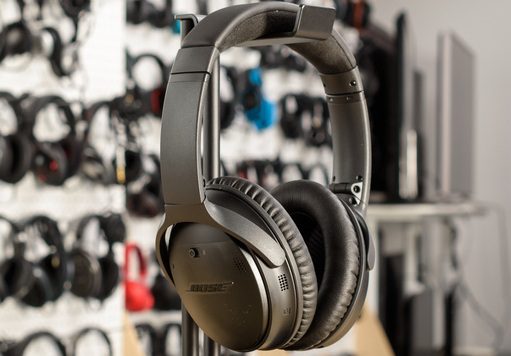
Finding the perfect pair of headphones can sometimes feel like searching for a needle in a haystack. However, some products stand the test of time and remain favorites long after their initial release. The Bose QuietComfort 35 II is one such product. Whether you are a frequent flyer, a daily commuter, or someone who just needs peace and quiet in a busy office, these headphones have likely been on your radar.
In this comprehensive review, we will dive deep into what makes the Bose QuietComfort 35 II a top contender even today. We will explore its legendary noise cancelling capabilities, its unparalleled comfort, and why it remains a smart investment for audiophiles and casual listeners alike.
Why the Bose QuietComfort 35 II Remains a Top Choice
When you first put on the Bose QuietComfort 35 II, the first thing you notice is the silence. It isn’t just a reduction in noise; it is a transformation of your environment. But beyond the quiet, there is a lot more to love. From its durable build to its smart features, this headset was designed to be your daily companion.
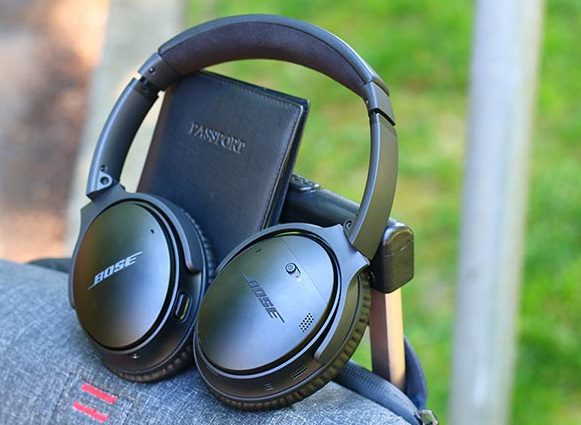
Legendary Noise Cancellation Technology
The standout feature of the Bose QuietComfort 35 II is undoubtedly its Acoustic Noise Cancelling technology. Bose has spent decades refining this tech, and it shows. The headphones continuously measure, compare, and react to outside noise, canceling it with an opposite signal.
What sets the Bose QuietComfort 35 II apart from its predecessors is the ability to adjust the level of cancellation. By using the dedicated Action button, you can toggle between three settings:
- High noise cancellation for loud environments like airplanes or trains.
- Low noise cancellation for quieter places like a windy park or a quiet office.
- Off, for when you need to be fully aware of your surroundings.
This flexibility allows you to tailor your listening experience to your specific environment, ensuring you are never cut off from the world unless you want to be.
Unmatched Comfort for Long Listening Sessions
If you wear headphones for hours at a time, you know that comfort is king. The Bose QuietComfort 35 II excels in this department. The headband is wrapped in Alcantara cushion material. This is the same soft covering used in high-end automobiles and yachts, providing a luxurious feel that rests gently on your head.
The ear cushions are manufactured from a synthetic protein leather that feels incredibly soft against the skin. They are designed to create a seal that blocks out passive noise without exerting too much pressure. The result is a lightweight and comfortable fit that makes you forget you are even wearing headphones. You can easily wear the Bose QuietComfort 35 II for an entire long-haul flight without experiencing the dreaded “headphone fatigue.”
Build Quality and Durability
You need headphones that can keep up with your busy lifestyle. The Bose QuietComfort 35 II is built to last. It is constructed with impact-resistant materials, including glass-filled nylon and corrosion-resistant stainless steel. This makes the headphones incredibly durable and able to withstand drops, bumps, and being tossed into a backpack.
Despite their rugged construction, they don’t look bulky or industrial. They maintain a sleek, professional aesthetic that looks good in the office or on the street. The ear cups fold flat and the headphones come with a solid carrying case, making them easy to transport safely.
Technical Specifications and Performance
Let’s get into the nitty-gritty of how the Bose QuietComfort 35 II performs under the hood. It isn’t just about feeling good; it’s about sounding good too.
Sound Quality at Any Volume
One common issue with headphones is that music can sound different depending on the volume. Bass might disappear at low levels, or treble might become harsh when you crank it up. Bose solved this with their volume-optimized EQ.
The Bose QuietComfort 35 II automatically adjusts the frequency response based on your listening volume. This ensures that you get balanced audio performance whether you are listening quietly in a library or blasting your favorite tunes on a busy street. The bass remains rich and the highs stay clear, providing a consistent and enjoyable listening experience every time.
Seamless Connectivity
Connecting your devices to the Bose QuietComfort 35 II is a breeze thanks to Bluetooth and NFC pairing. Voice prompts walk you through the pairing process, so you don’t have to guess if you are connected.
Multi-Point Technology
One of the most advanced features is the ability to connect to two devices. You can be watching a movie on your iPad and, if a call comes in on your smartphone, the Bose QuietComfort 35 II will automatically pause the video and switch to the call. Once you hang up, it switches right back. This seamless transition makes multitasking effortless.
Battery Life That Lasts
There is nothing worse than your headphones dying in the middle of a trip. The Bose QuietComfort 35 II boasts an impressive 20-hour battery life when using wireless noise cancellation. This is enough juice to get you through the longest international flights or several days of commuting.
If you do run out of power, a quick 15-minute charge gives you another 2.5 hours of play time. And if you are truly stuck without a charger, you can use the included audio cable to listen in wired mode (though noise cancellation won’t work without battery power).
Crystal Clear Calls
The Bose QuietComfort 35 II features a noise-rejecting dual-microphone system. This system helps clear up phone calls, even in noisy or windy environments. The person on the other end will hear you clearly, and thanks to sidetone technology, you will be able to hear your own voice naturally, preventing you from shouting unnecessarily.
Smart Features for the Modern User
The “II” in Bose QuietComfort 35 II signifies a major upgrade: the addition of a dedicated Action button for voice assistants.
Your Personal Voice Assistant
With the Bose QuietComfort 35 II, you have instant access to Google Assistant or Amazon Alexa. You can play music, receive texts, manage your daily tasks, and get answers to questions—all without looking at your phone. Just press and hold the Action button on the left ear cup to start talking to your voice assistant.
If you aren’t a user of these assistants, you can use the Action button to adjust your noise cancellation levels instead. This level of customization ensures the Bose QuietComfort 35 II works the way you want it to.
The Bose Connect App
To get the most out of your Bose QuietComfort 35 II, you should download the Bose Connect app. It allows you to:
- Manage your Bluetooth connections.
- Update your headphones with the latest software.
- Adjust noise cancellation levels.
- Access music sharing features to listen with a friend who also has Bose Bluetooth headphones.
Comparing the Bose QuietComfort 35 II
To help you decide if the Bose QuietComfort 35 II is right for you, let’s compare it to another popular model in the same category.
Comparison Table: Bose QC35 II vs. Standard Competitors
| Feature | Bose QuietComfort 35 II | Standard Competitor Headphones |
| Noise Cancelling | World-class, adjustable (3 levels) | Often binary (On/Off) or non-adjustable |
| Battery Life | 20-hour battery life (Wireless) | Typically 15-18 hours |
| Comfort | Alcantara cushion, lightweight | Standard foam, often heavier |
| Assistant | Built-in Google Assistant/Alexa | Often requires phone interaction |
| Microphone | Noise-rejecting dual-microphone system | Standard single mic |
| Sound Tech | Volume-optimized EQ | Standard drivers |
| Build | Durable glass-filled nylon | Standard plastic |
As you can see, the Bose QuietComfort 35 II offers a comprehensive package that prioritizes user experience and quality materials over gimmicks.
Who Should Buy the Bose QuietComfort 35 II?
The Bose QuietComfort 35 II is not just for one type of person. Its versatility makes it suitable for a wide range of users.
For Travelers
If you spend a lot of time on planes, trains, or buses, the active noise cancelling is a lifesaver. It drowns out the engine drone and chatter, allowing you to sleep or focus on your entertainment. The comfort and lightweight design mean you can wear them from takeoff to landing without discomfort.
For Office Workers
Open-plan offices can be distracting. The Bose QuietComfort 35 II helps you create a private zone of concentration. The ability to pair with two devices means you can listen to music on your laptop but still take calls on your phone without fumbling with settings.
For Students
Studying requires focus. The Bose QuietComfort 35 II provides the quiet environment needed to retain information. Plus, the durable build means they can survive being tossed into a backpack full of heavy textbooks.
Tips for Getting the Best Experience
- Update Often: Use the Bose Connect app to keep your firmware updated. Bose often releases improvements to noise cancellation and connectivity.
- Check the Fit: Ensure the ear cups fully surround your ears to maximize the passive noise isolation.
- Use the Cable: Keep the wired cable handy. It not only saves battery but also allows you to connect to in-flight entertainment systems.
- Clean the Cushions: Wipe down the ear cushions occasionally to keep the protein leather soft and clean.
Conclusion
The Bose QuietComfort 35 II has earned its reputation as a gold standard in the world of wireless headphones. It strikes a perfect balance between functional technology and luxurious design. While newer models may have flashy new features, the Bose QuietComfort 35 II focuses on what truly matters: silencing the world around you and delivering exceptional audio in total comfort.
With its 20-hour battery life, volume-optimized EQ, and robust Bluetooth connectivity, it remains a reliable workhorse for anyone who values high-quality audio. Whether you are using the voice assistant to manage your day or simply enjoying the silence of the noise cancelling, the Bose QuietComfort 35 II delivers a premium experience that is hard to beat.
If you are looking for headphones that are durable, sound amazing, and feel great, the Bose QuietComfort 35 II should be at the top of your list.
Frequently Asked Questions (FAQs)
1. Can I use the Bose QuietComfort 35 II when the battery is dead?
Yes, you can! The Bose QuietComfort 35 II comes with an audio cable. You can plug this into your device and continue listening to music even if the battery is completely drained. However, keep in mind that the active noise cancelling and the volume-optimized EQ require power, so these features will not function in passive wired mode.
2. Is the Bose QuietComfort 35 II water or sweat resistant?
The Bose QuietComfort 35 II is not officially rated as water or sweat resistant. While they are durable and built to handle daily life, they are not designed for intense workouts where you might sweat heavily, or for use in the rain. Moisture can damage the sensitive electronics inside the ear cups.
3. How do I switch between connected devices?
The Bose QuietComfort 35 II uses Bluetooth multipoint technology. If you have two devices connected (like a phone and a tablet), you can simply pause audio on the first device and play it on the second. The headphones will switch the audio source automatically. To switch to a completely new device, slide the power switch to the Bluetooth symbol and hold it until you hear “Ready to pair.”
4. Can I turn off the noise cancelling feature?
Yes. You can adjust the noise cancelling settings using the Bose Connect app or the Action button on the left ear cup. You can cycle through High, Low, or Off settings. This is useful if you are in a quiet environment and want to save battery life or if you need to hear announcements.
5. Does the microphone work for calls when wired?
No, the microphone system on the Bose QuietComfort 35 II only works when connected via Bluetooth. If you use the included backup audio cable to connect to a device, the built-in microphones are disabled. You would need an audio cable with an inline microphone (sold separately) to make calls in wired mode.

